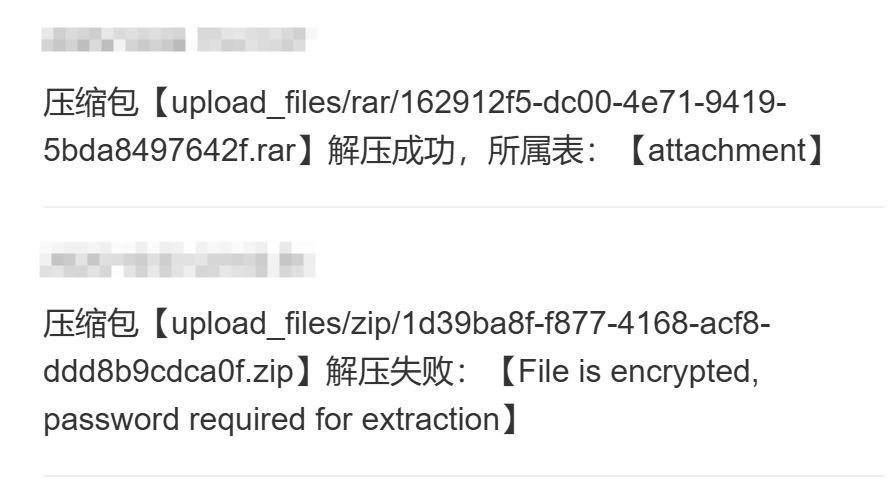
阿里云OSS提供了上传ZIP文件使用函数计算自动解压的实现,但是不支持其他格式,本文介绍如何基于其默认代码模板实现上传RAR/7Z文件自动解压。
首先,在阿里云OSS控制台找到“ZIP包解压”,点击按钮创建一个新的函数:
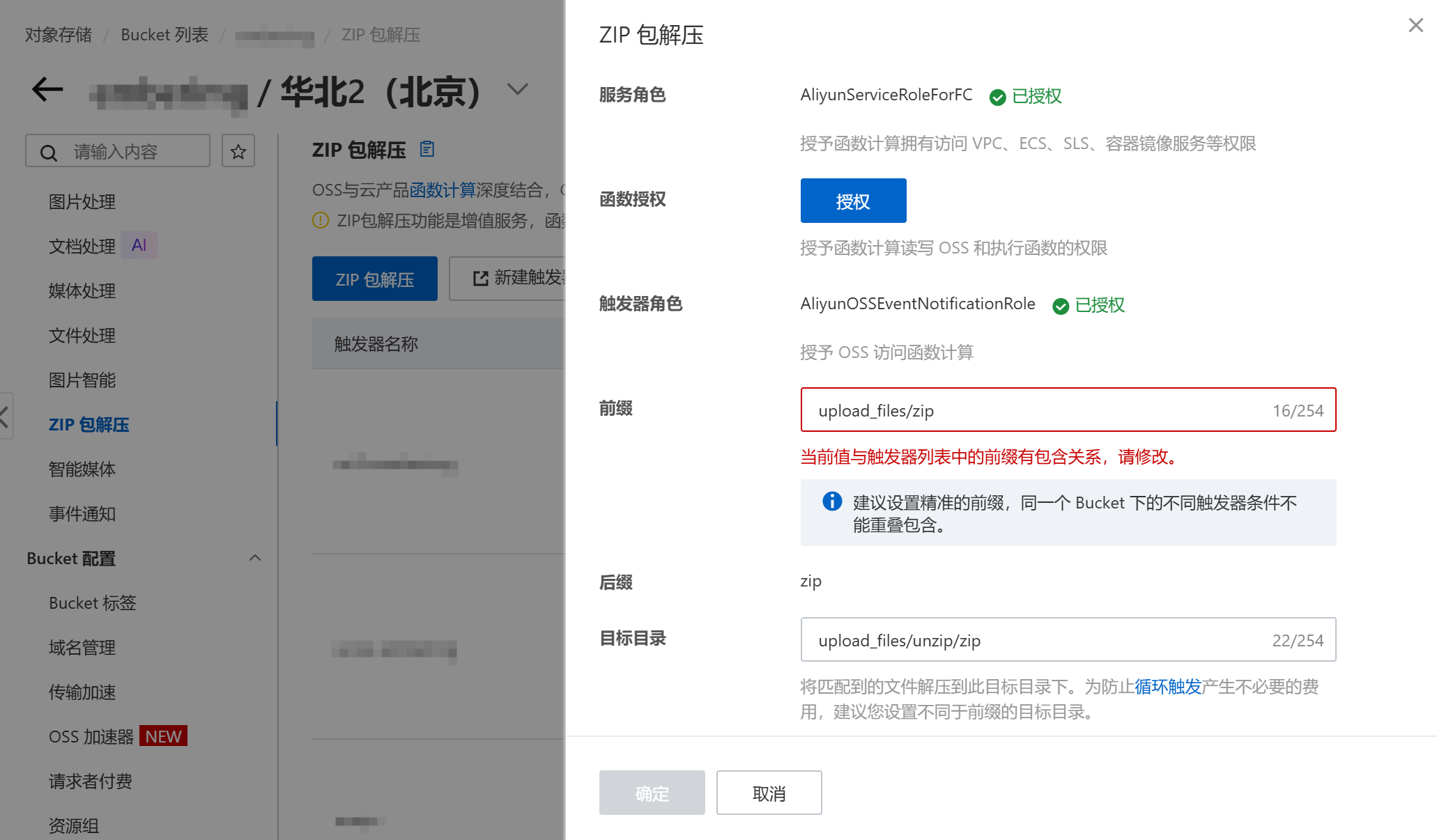
注意: 这里的前缀和目标目录最好不能有父子目录关系,否则如果解压后的文件仍然有压缩包,会导致无限循环解压。创建完成后,进入函数计算控制台,找到该函数。可以看到已经自动生成了一个
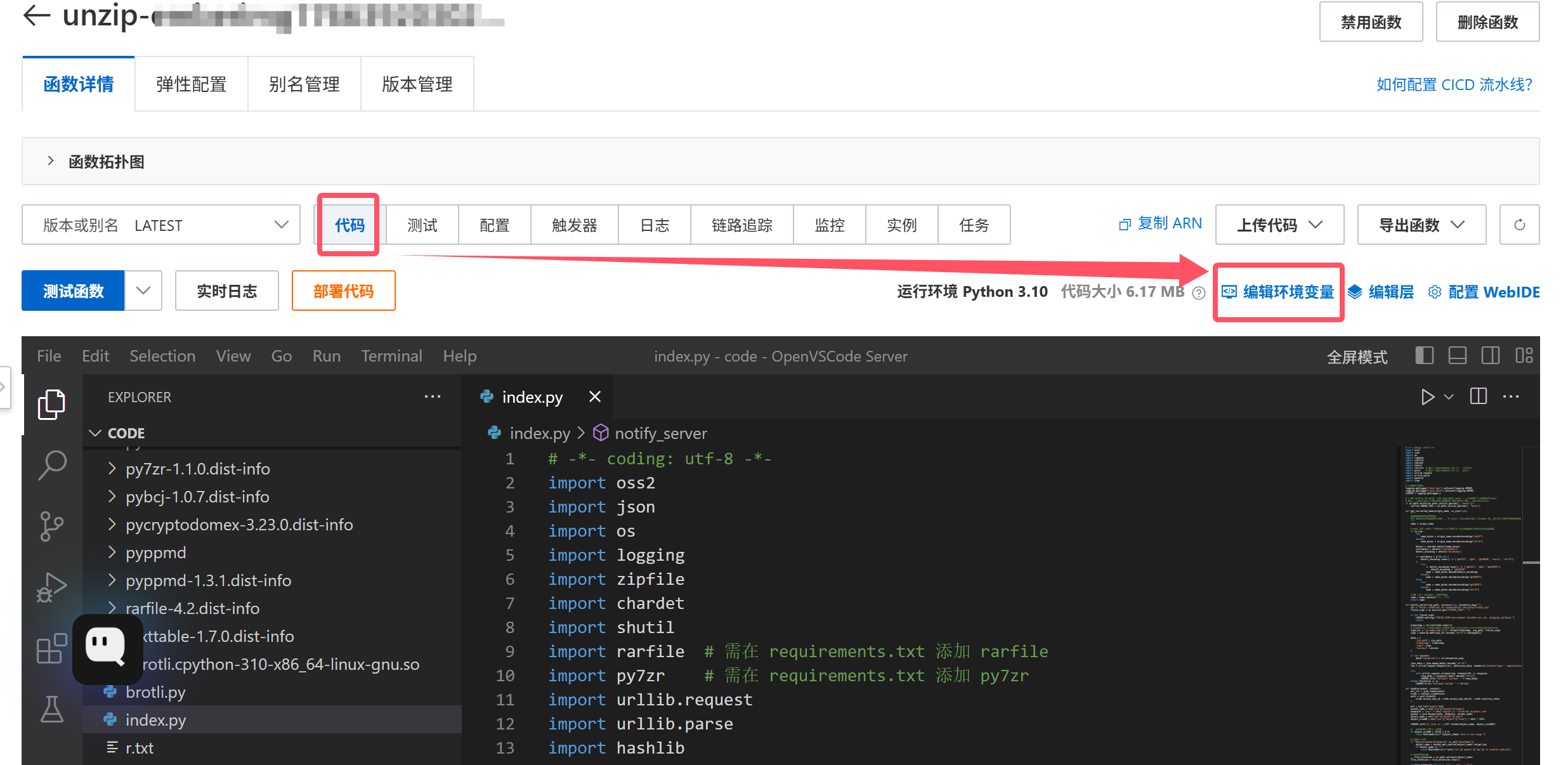
index.py和一个speed.py文件。index.py是函数计算会执行的主文件,speed.py是压缩包里面小文件较多时的速度优化方案(这里暂时不管)。
index.py内容应该类似于:
 1# -*- coding: utf-8 -*-
 2"""
 3声明:
 4这个函数针对文件和文件夹命名编码是如下格式:
 51. mac/linux 系统, 默认是utf-8
 62. windows 系统, 默认是gb2312, 也可以是utf-8
 7
 8对于其他编码,我们这里尝试使用chardet这个库进行编码判断,但是这个并不能保证100% 正确,
 9建议用户先调试函数,如果有必要改写这个函数,并保证调试通过
10
11Statement:
12This function names and encodes files and folders as follows:
131. MAC/Linux system, default is utf-8
142. For Windows, the default is gb2312 or utf-8
15
16For other encodings, we try to use the chardet library for coding judgment here,
17but this is not guaranteed to be 100% correct.
18If necessary to rewrite this function, and ensure that the debugging pass
19"""
20
21import oss2
22import json
23import os
24import logging
25import zipfile
26import chardet
27
28# Close the info log printed by the oss SDK
29logging.getLogger("oss2.api").setLevel(logging.ERROR)
30logging.getLogger("oss2.auth").setLevel(logging.ERROR)
31
32LOGGER = logging.getLogger()
33# ...
我们点击“编辑环境变量”,可以看到里面目前只有两个环境变量:PROCESSED_DIR和RETAIN_FILE_NAME,分别代表ZIP包解压后的目标目录和是否将压缩包文件名作为新目录名(我们刚刚设置的)。
它们在代码里的位置类似于:
1    PROCESSED_DIR = os.environ.get("PROCESSED_DIR", "")
2    RETAIN_FILE_NAME = os.environ.get("RETAIN_FILE_NAME", "")
3    if RETAIN_FILE_NAME == "false":
4        newKeyPrefix = PROCESSED_DIR
5    else:
6        newKeyPrefix = os.path.join(PROCESSED_DIR, zip_name)
7    newKeyPrefix = newKeyPrefix.replace(".zip", "/")
8    # ...
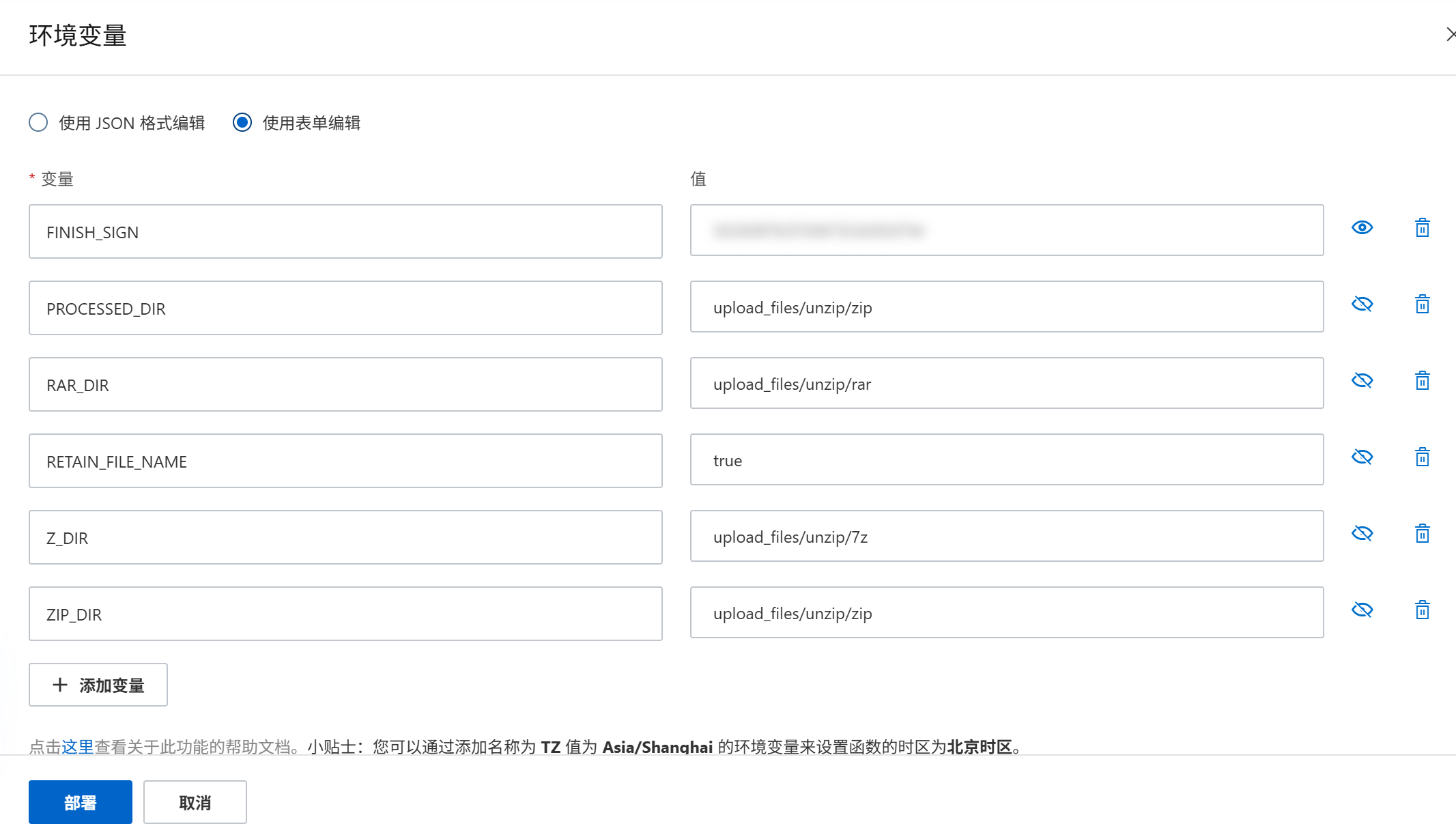
为了支持RAR/7Z文件,我们需要添加几个环境变量:ZIP_DIR、RAR_DIR、Z_DIR(环境变量不支持以数字开头),分别代表ZIP/RAR/7Z文件的解压目录。我还额外添加了一个解压成功回调应用服务器的签名private key。配置完成后点击部署。
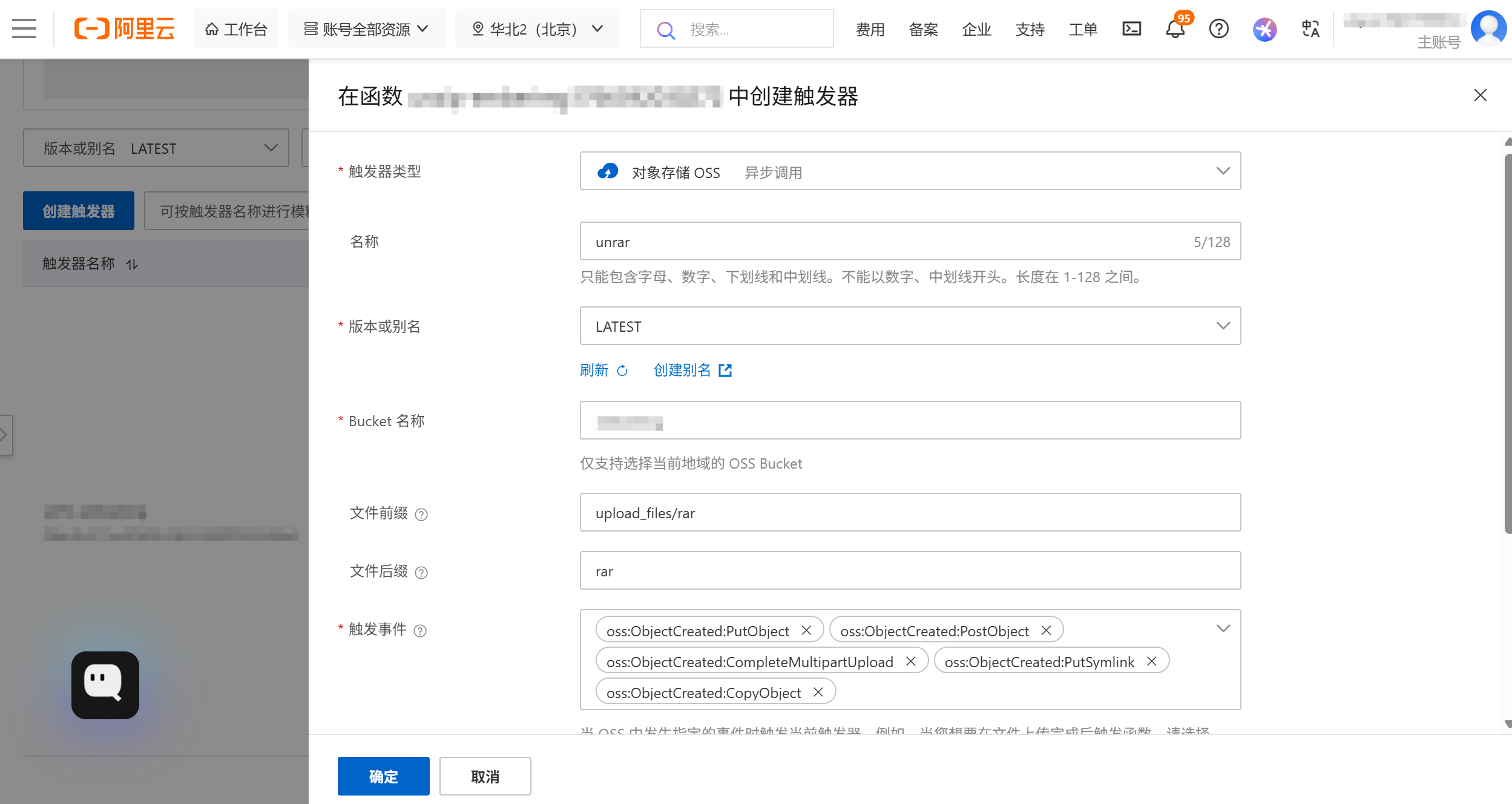
然后打开触发器选项,新建触发器,分别添加RAR和7Z文件的触发器。这里以RAR为例,仿照ZIP的参数,设置RAR文件的前缀和后缀(rar)。注意这里“触发事件”默认不包含CopyObject事件,如果希望复制压缩包也触发解压,需要手动添加此事件。
配置完触发器后,我们再更改index.py代码,添加对RAR/7Z文件的解压逻辑。注意,我们要安装两个额外的库:rarfile和py7zr。首先,我们在Web VSCode里面index.py目录下新建一个r.txt:
1rarfile
2py7zr
然后按Ctrl+`激活Web VSCode终端,输入pip3 install -t . -r r.txt安装这些库到当前目录(非常重要)。由于rarfile包底层需要调用unrar命令,所以我们还需要安装Linux的unrar命令。在终端使用wget:
1wget https://www.rarlab.com/rar/rarlinux-x64-712.tar.gz
如果这个链接失效,可以在这里查看最新版本对应下载链接。然后解压并移动unrar到当前目录,并赋予执行权限:
1tar -zxvf rarlinux-x64-712.tar.gz
2mv rar/unrar .
3chmod +x unrar
4rm -rf rar rarlinux-x64-712.tar.gz
现在Web VSCode文件管理器左侧目录里应该有:index.py、unrar 文件、以及一大堆 py7zr 等文件夹。然后我们开始写index.py的代码。这是我的代码,复用了模板中对文件名的编码修正(这个非常重要,实测没修正解压出来会有很多乱码),并且实现了解压成功或失败都回调应用服务器的逻辑。
  1# -*- coding: utf-8 -*-
  2import oss2
  3import json
  4import os
  5import logging
  6import zipfile
  7import chardet
  8import shutil
  9import rarfile
 10import py7zr
 11import urllib.request
 12import urllib.parse
 13import hashlib
 14import time
 15
 16# 设置日志级别
 17logging.getLogger("oss2.api").setLevel(logging.ERROR)
 18logging.getLogger("oss2.auth").setLevel(logging.ERROR)
 19LOGGER = logging.getLogger()
 20
 21# 配置 rarfile 的 unrar 路径 (我们已经把 unrar 二进制文件放在了代码根目录)
 22if os.path.exists(os.path.join(os.getcwd(), "unrar")):
 23    rarfile.UNRAR_TOOL = os.path.join(os.getcwd(), "unrar")
 24
 25def get_corrected_name(origin_name):
 26    """
 27    处理文件名编码问题。
 28    ZIP 文件常有编码问题,RAR 和 7Z 通常是 Unicode,但在 Windows 下也可能有路径分隔符问题。
 29    这里统一尝试修复编码,以防万一。
 30    """
 31    name = origin_name
 32
 33    # 尝试复杂的编码猜测
 34    try:
 35        # 许多乱码是因为 ZIP 默认用 cp437 读取了 GBK/UTF-8
 36        name_bytes = origin_name.encode(encoding="cp437")
 37    except:
 38        name_bytes = origin_name.encode(encoding="utf-8")
 39
 40    detect = chardet.detect(name_bytes)
 41    confidence = detect["confidence"]
 42    detect_encoding = detect["encoding"]
 43
 44    if confidence > 0.75 and (
 45        detect_encoding.lower() in ["gb2312", "gbk", "gb18030", "ascii", "utf-8"]
 46    ):
 47        try:
 48            if detect_encoding.lower() in ["gb2312", "gbk", "gb18030"]:
 49                detect_encoding = "gb18030"
 50            name = name_bytes.decode(detect_encoding)
 51        except:
 52            name = name_bytes.decode(encoding="gb18030")
 53    else:
 54        try:
 55            name = name_bytes.decode(encoding="gb18030")
 56        except:
 57            name = name_bytes.decode(encoding="utf-8")
 58
 59    # 统一修复 Windows 路径分隔符
 60    name = name.replace("\\", "/")
 61    return name
 62
 63def notify_server(zip_path, success=True, exception_msg=""):
 64    # 自行实现回调服务器的逻辑,这里不展示
 65
 66def handler(event, context):
 67    evt_lst = json.loads(event)
 68    creds = context.credentials
 69    auth = oss2.StsAuth(
 70        creds.access_key_id, creds.access_key_secret, creds.security_token
 71    )
 72
 73    evt = evt_lst["events"][0]
 74    bucket_name = evt["oss"]["bucket"]["name"]
 75    endpoint = "oss-" + evt["region"] + "-internal.aliyuncs.com"
 76    bucket = oss2.Bucket(auth, endpoint, bucket_name)
 77    object_name = evt["oss"]["object"]["key"]
 78    object_sizeMB = evt["oss"]["object"]["size"] / 1024 / 1024
 79
 80    LOGGER.info("{} size is = {}MB".format(object_name, object_sizeMB))
 81
 82    # 检查文件大小限制 (10GB)
 83    if object_sizeMB > 10240 * 0.9:
 84        raise RuntimeError(f"{object_name} size is too large.")
 85
 86    # 处理软链接
 87    if "ObjectCreated:PutSymlink" == evt["eventName"]:
 88        object_name = bucket.get_symlink(object_name).target_key
 89        if object_name == "":
 90            raise RuntimeError(f"{evt['oss']['object']['key']} is invalid symlink")
 91
 92    # 获取文件后缀
 93    _, file_extension = os.path.splitext(object_name)
 94    file_extension = file_extension.lower()
 95
 96    if file_extension not in ['.zip', '.rar', '.7z']:
 97        raise RuntimeError(f"{object_name} filetype is not supported (zip/rar/7z)")
 98
 99    LOGGER.info(f"start to decompress {file_extension} file = {object_name}")
100
101    # --- 配置不同类型的环境变量 ---
102    # 根据后缀选择对应的环境变量,如果没配则默认为空
103    if file_extension == '.zip':
104        target_dir_root = os.environ.get("ZIP_DIR", "")
105    elif file_extension == '.rar':
106        target_dir_root = os.environ.get("RAR_DIR", "")
107    elif file_extension == '.7z':
108        target_dir_root = os.environ.get("Z_DIR", "")
109
110    # 获取文件名(不含路径)
111    archive_name = os.path.basename(object_name)
112
113    # 是否保留文件夹结构
114    RETAIN_FILE_NAME = os.environ.get("RETAIN_FILE_NAME", "")
115    if RETAIN_FILE_NAME == "false":
116        newKeyPrefix = target_dir_root
117    else:
118        newKeyPrefix = os.path.join(target_dir_root, archive_name)
119
120    # 确保前缀以 / 结尾(如果非空)
121    if newKeyPrefix and not newKeyPrefix.endswith('/'):
122        newKeyPrefix += '/'
123
124    # 移除后缀名部分作为目录 (例如 xxx.zip -> xxx/)
125    # 注意:这里可能会导致重复斜杠,如果 newKeyPrefix 已经是 '.../zip/' 且 file_extension 是 '.zip'
126    # 替换后可能变成 '.../zip//'
127    # 我们改用 splitext 来处理,更稳健
128
129    if RETAIN_FILE_NAME != "false":
130        # 如果是保留文件夹结构,我们希望把文件名作为目录
131        # newKeyPrefix 现在是 "root_dir/filename.ext/"
132        # 我们想把它变成 "root_dir/filename/"
133        if newKeyPrefix.endswith('/'):
134            newKeyPrefix = newKeyPrefix[:-1] # 去掉末尾斜杠以便处理后缀
135
136        if newKeyPrefix.lower().endswith(file_extension):
137            newKeyPrefix = newKeyPrefix[:-len(file_extension)]
138
139        newKeyPrefix += '/'
140
141
142    # 准备临时目录
143    tmpWorkDir = "/tmp/{}".format(context.request_id)
144    if not os.path.exists(tmpWorkDir):
145        os.makedirs(tmpWorkDir)
146
147    local_archive_path = os.path.join(tmpWorkDir, archive_name)
148    bucket.get_object_to_file(object_name, local_archive_path)
149
150    try:
151        # === ZIP 处理逻辑 ===
152        if file_extension == '.zip':
153            with zipfile.ZipFile(local_archive_path) as zip_ref:
154                for file_info in zip_ref.infolist():
155                    if file_info.is_dir():
156                        continue
157                    process_and_upload(
158                        bucket, zip_ref, file_info.filename, file_info.file_size,
159                        tmpWorkDir, newKeyPrefix, object_sizeMB
160                    )
161
162        # === RAR 处理逻辑 ===
163        elif file_extension == '.rar':
164            # rarfile 需要系统安装 unrar
165            with rarfile.RarFile(local_archive_path) as rar_ref:
166                for file_info in rar_ref.infolist():
167                    if file_info.isdir():
168                        continue
169                    process_and_upload(
170                        bucket, rar_ref, file_info.filename, file_info.file_size,
171                        tmpWorkDir, newKeyPrefix, object_sizeMB
172                    )
173
174        # === 7Z 处理逻辑 ===
175        elif file_extension == '.7z':
176            with py7zr.SevenZipFile(local_archive_path, mode='r') as z_ref:
177                # py7zr 获取文件列表的方式略有不同
178                for file_info in z_ref.list():
179                    if file_info.is_directory:
180                        continue
181
182                    # 检查大小
183                    if object_sizeMB + file_info.uncompressed / 1024 / 1024 > 10240 * 0.99:
184                        LOGGER.error(f"{file_info.filename} skipped (disk full risk)")
185                        continue
186
187                    z_ref.extract(targets=[file_info.filename], path=tmpWorkDir)
188
189                    # 上传逻辑
190                    upload_file(bucket, file_info.filename, tmpWorkDir, newKeyPrefix)
191
192        # Callback to server
193        notify_server(object_name, success=True)
194
195    except Exception as e:
196        LOGGER.error(f"Decompression failed: {e}")
197        notify_server(object_name, success=False, exception_msg=e)
198        raise e
199    finally:
200        # 清理临时目录
201        if os.path.exists(tmpWorkDir):
202            shutil.rmtree(tmpWorkDir)
203
204def process_and_upload(bucket, archive_ref, filename, file_size, tmp_dir, prefix, total_zip_size):
205    """
206    辅助函数:用于 ZIP 和 RAR 的解压上传(因为它们的接口相似)
207    """
208    if total_zip_size + file_size / 1024 / 1024 > 10240 * 0.99:
209        LOGGER.error(f"{filename} skipped due to size limit")
210        return
211
212    # 解压单个文件
213    archive_ref.extract(filename, tmp_dir)
214    upload_file(bucket, filename, tmp_dir, prefix)
215
216
217def upload_file(bucket, original_filename, tmp_dir, prefix):
218    """
219    辅助函数:处理路径、重命名并上传
220    """
221    local_file_path = os.path.join(tmp_dir, original_filename)
222
223    # 修正文件名(处理乱码和路径分隔符)
224    corrected_name = get_corrected_name(original_filename)
225
226    # 拼接 OSS Key
227    new_oss_key = os.path.join(prefix, corrected_name).replace("\\", "/")
228
229    LOGGER.info(f"uploading {original_filename} to {new_oss_key}")
230    bucket.put_object_from_file(new_oss_key, local_file_path)
231
232    # 上传后立即删除本地文件以释放空间
233    if os.path.exists(local_file_path):
234        os.remove(local_file_path)
写完代码记得点击 【部署代码】 。然后实测可以正确解压并通知到应用服务器,解压失败也能通知到应用服务器(OSS触发器默认会重试3次):